# Using the app
Start a chat or open a workflow from the sidebar. Projects group work by repository; Settings holds provider and integration setup.
```mermaid
flowchart LR
Sidebar["Sidebar"] --> Chat["New chat A saved conversation"]
Sidebar --> Workflow["Workflows Reusable graphs"]
Workflow --> Canvas["Canvas Connect the steps"]
Canvas --> Inspector["Inspector Configure one node"]
Canvas --> Dock["Chat · Run trace · History Follow and review the run"]
Sidebar --> Settings["Settings Providers and integrations"]
```
## Main navigation
| Area | What it does |
| --- | --- |
| **New chat** | Starts a saved [direct chat](https://philbotar.github.io/OpenFlow/guides/direct-chats.html), no workflow needed. |
| **Agents** | Saved agent definitions for [callable agents](https://philbotar.github.io/OpenFlow/guides/tools-and-integrations.html#saved-and-callable-agents). |
| **Schedule** | Adds a [timed or interval schedule](https://philbotar.github.io/OpenFlow/guides/scheduling.html) to an existing workflow. |
| **Workflows** | App-level workflows. **New workflow** creates one; the row menu renames or deletes it. |
| **Projects** | Registered repository folders and their [project-local workflows](https://philbotar.github.io/OpenFlow/guides/projects-and-persistence.html). |
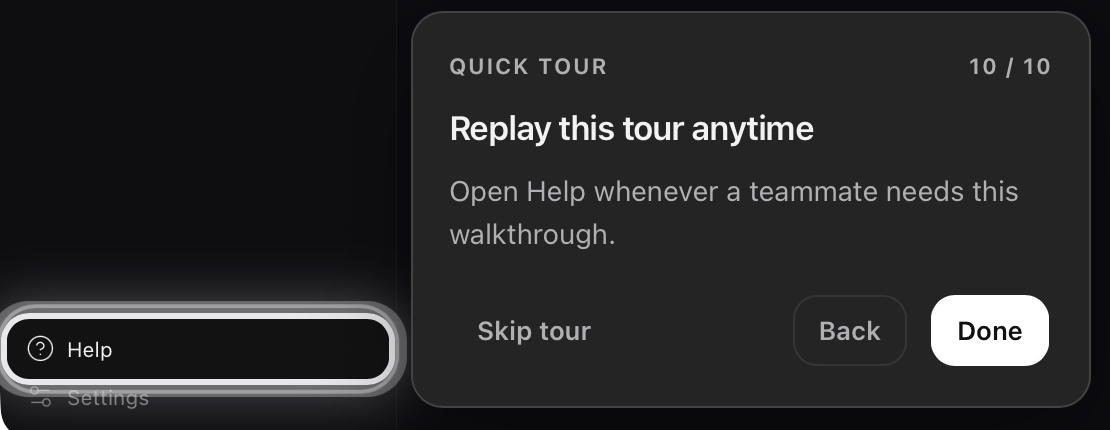
| **Help** | Replays the guided tour: **Next**, **Back**, **Skip tour**, or Escape. |
| **Settings** | Appearance, Providers, Search, MCP Servers, Diagnostics, and About. |
The **Chats**, **Workflows**, and **Projects** headings always show their `+` action. A project row menu has **New workflow**, **Create with AI**, **Copy from…**, and **Remove project**.
## Common screens
- [Direct chats](https://philbotar.github.io/OpenFlow/guides/direct-chats.html): a full-page composer with durable run history. They don't appear in the workflow catalog or canvas.
- [Workflow editor](https://philbotar.github.io/OpenFlow/guides/workflow-authoring.html): Canvas, Inspector, Workflow Settings, and a bottom dock with **Chat**, **Terminal**, **Run trace**, and **History**. **Chat**, **Run trace**, and **History** cover [conversation, inspection, and recovery](https://philbotar.github.io/OpenFlow/guides/runs.html).
## Composer controls
Depending on screen and provider, the composer shows **Project**, **Model**, **Speed**, **Approval mode**, and **Reasoning effort**. Type `/` to invoke a discovered skill or `@` to reference project files. Approval prompts appear in the conversation when a tool needs confirmation. Limits and defaults: [configuration reference](https://philbotar.github.io/OpenFlow/reference/configuration.html).
## Provider readiness
The header shows **Provider ready** or **Connect provider**. A workflow can inherit the active provider, use a workflow provider, or override it on a node. Every provider referenced at run start must be ready. To connect one, see [Provider setup](https://philbotar.github.io/OpenFlow/guides/provider-setup.html); if readiness fails, see [Troubleshooting](https://philbotar.github.io/OpenFlow/troubleshooting/#provider-not-ready).
## Workflow controls
| Capability | What you do | Read |
| --- | --- | --- |
| Visual workflow editor | Add nodes, connect edges, configure the Inspector, fix validation errors before **Run** | [First workflow](https://philbotar.github.io/OpenFlow/guides/first-workflow.html), [Using the app](https://philbotar.github.io/OpenFlow/guides/using-the-app.html) |
| Parallel agent layers | Wire independent branches from one upstream node; same-depth nodes run concurrently | [Workflows and runs](https://philbotar.github.io/OpenFlow/concepts/workflows-and-runs.html#parallel-layers) |
| Multi-provider models | Credentials in **Settings → Providers**; per-node model in the Inspector | [Provider setup](https://philbotar.github.io/OpenFlow/guides/provider-setup.html) |
| Tools (files, shell, search, …) | Inspector **Tools** → **Approval mode**; approve or deny prompts in chat | [Tools reference](https://philbotar.github.io/OpenFlow/reference/tools.html), [Tools and integrations](https://philbotar.github.io/OpenFlow/guides/tools-and-integrations.html#approval-modes) |
| Subagents (callable agents) | Save configs on the **Agents** screen; attach them in Inspector **Subagents** | [Tools and integrations](https://philbotar.github.io/OpenFlow/guides/tools-and-integrations.html#saved-and-callable-agents), [Callable agents](https://philbotar.github.io/OpenFlow/architecture/callable-agents.html) |
| Interactive vs hands-off runs | Per-node approval mode **Always ask** or **Auto-approve all** | [Tools and integrations](https://philbotar.github.io/OpenFlow/guides/tools-and-integrations.html#approval-modes) |
| Project-aware workflows | **Projects** → add repo folder; workflows in `.flow/workflows/`; `@` file refs in chat | [Using the app](https://philbotar.github.io/OpenFlow/guides/using-the-app.html), [Storage paths](https://philbotar.github.io/OpenFlow/reference/#runtime-and-persistence-paths) |
| Create with AI | **Create with AI** drafts a graph from chat | [Workflow authoring](https://philbotar.github.io/OpenFlow/guides/workflow-authoring.html#create-with-ai-safely) |
| Schedules | Sidebar **Schedule**, for saved workflows | [Scheduling](https://philbotar.github.io/OpenFlow/guides/scheduling.html) |
| Run history & resume | Dock **History** → replay or resume | [Runs and recovery](https://philbotar.github.io/OpenFlow/guides/runs.html#review-and-replay), [Workflows and runs](https://philbotar.github.io/OpenFlow/concepts/workflows-and-runs.html#run) |
| Post-run suggestions | **Run review** in chat after a successful run | [Workflows and runs](https://philbotar.github.io/OpenFlow/concepts/workflows-and-runs.html#run) |
| Plan → Execute | Workflow settings → **Plan → Execute** | [Workflows and runs](https://philbotar.github.io/OpenFlow/concepts/workflows-and-runs.html#plan--execute) |
| MCP servers | **Settings → MCP Servers** | [MCP servers](https://philbotar.github.io/OpenFlow/guides/tools-and-integrations.html#mcp-servers) |
| Web search keys | **Settings → Search**, used by search-cli during runs | [Web search](https://philbotar.github.io/OpenFlow/guides/tools-and-integrations.html#web-search) |
| Terminal in the dock | Dock **Terminal** tab | [App screens](https://philbotar.github.io/OpenFlow/guides/using-the-app.html#common-screens) |
## Replay the guided tour
**Help** replays a tour of **Create with AI**, node inspection, and **Run** / **Stop**.
[](https://philbotar.github.io/OpenFlow/media/screenshots/help-tour-replay.png)
Help, at the bottom of the sidebar, reopens the tour; Done closes its final step. Select the image for full resolution.